
Gear · AC style
Big gear, speed and an RPM bar with shift flash, pedals – plus live delta and lap time below.
- Gear changes pop (red up, white down)
- Pit limiter warning in the pit lane
Download · Assetto Corsa
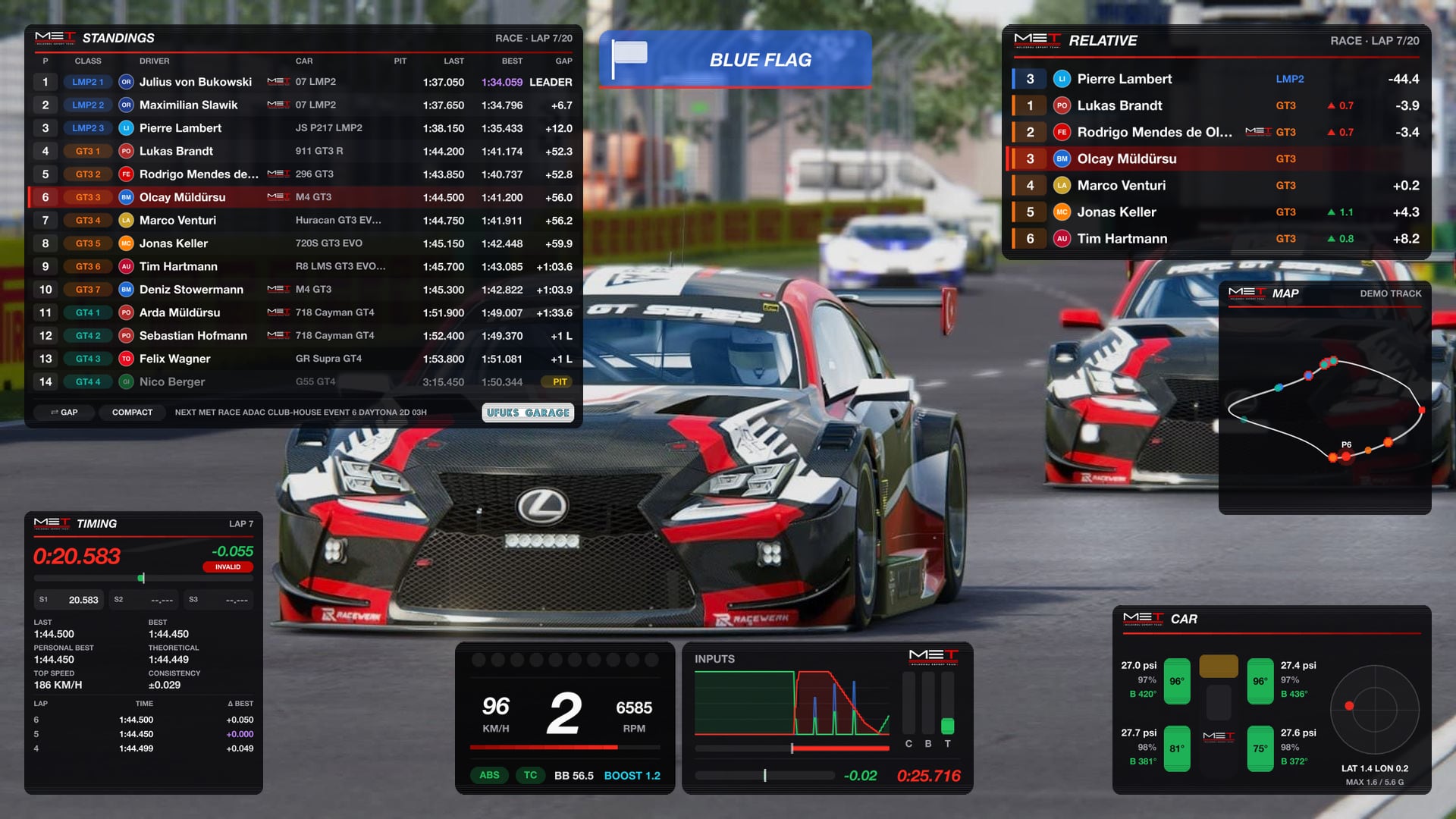
Our own HUD for Assetto Corsa: 12 windows from gear & telemetry, delta, sectors and fuel to radar, track map and standings – in the Müldürsu eSport Team look with smooth animations. Free for every sim racer.
Version 1.1.0 · ZIP · 155 KB · for Assetto Corsa (PC)
How to installBig gear, speed and an RPM bar with shift flash, pedals – plus live delta and lap time below.
Shift lights, gear in the middle, input telemetry with trace and steering – plus ABS, TC, brake bias and boost.
Lap time with live delta, sectors in purple/green/yellow, best lap, personal best per track and car, theoretical best, top speed, consistency and lap list.
Fuel in the tank, usage per lap, laps until empty and how much you still need to finish – plus air and track temperature.
Tyre temperature, pressure and wear, brake temperatures, damage and g-forces – coloured from cold (blue) to hot (red).
Who is right ahead of and behind you? Real time gap, trend (closing / dropping back), class and car – colour-coded for cars a lap ahead or behind.
The full standings with class, car, pit stops, last lap, best lap and gap or interval – with compact view, partner bar and countdown to the next MET race.
Your spotter: shows cars next to and behind you and warns in red on the side where it gets tight. Hides when nobody is close.
Track map with all cars in class colours – you pulse red, team mates are marked. If the track has no map, the overlay records it itself.

Appears automatically as soon as a rival is less than a second ahead of or behind you – with gap and trend.

Blue, yellow, black and white flag, chequered flag, penalty and final lap – shown big and animated.
Switch theme, size, units, name format, delta reference, partner bar and auto-hide right in the game – no restart.
The file contains the “apps” and “content” folders – laid out just like your Assetto Corsa folder.
With Content Manager: drag the ZIP into the window and click “Install”. Without: copy both folders into your Assetto Corsa folder and replace files (Steam › Assetto Corsa › Manage › Browse local files).
Content Manager: Settings › Assetto Corsa › Python apps › tick “MET Overlay”. Original launcher: Options › General › UI Modules.
Move the mouse to the right edge of the screen, click the MET windows in the app bar and place them. Next time they are there automatically.
Assetto Corsa…/assettocorsa/apps/python/MET_Overlay
Change the most important settings right in the game in the “MET Settings” window – they apply immediately. Everything else is in config.ini in the apps/python/MET_Overlay folder.
Yes. Gear display, relative, standings and map always follow the car you are watching. Fuel, tyre wear and damage show your own car.
No. Both work but are not required – the overlay only uses the official Assetto Corsa Python interface.
No. On game start it only asks our website once for a new version and the next MET race – without any data about you. Can be turned off in MET Settings (“UPDATE CHECK”).
Nothing. But we are happy if you follow our channels or cheer for us at a race.
Errors are logged in Documents › Assetto Corsa › logs › py_log.txt (lines with “[MET Overlay]”). Send us those lines at muelduersu-esport@gmx.de.
Download · Assetto Corsa
MET Overlay 1.1.0
Version 1.1.0 · ZIP · 155 KB · for Assetto Corsa (PC)